
EnergyLink App para mostrar información del mercado y resultados de las operaciones
 Torkel Ödegaard
60f68abd31
Dashboard schema simplifications, moved schema updates to dashboard model creation, removes irritating 'unsaved changes' dialogs that show for dashboard schema changes, Closes #532
Torkel Ödegaard
60f68abd31
Dashboard schema simplifications, moved schema updates to dashboard model creation, removes irritating 'unsaved changes' dialogs that show for dashboard schema changes, Closes #532
|
11 years ago | |
|---|---|---|
| sample | 11 years ago | |
| src | 11 years ago | |
| tasks | 11 years ago | |
| .gitignore | 11 years ago | |
| .jscs.json | 11 years ago | |
| .jshintrc | 11 years ago | |
| .travis.yml | 12 years ago | |
| CHANGELOG.md | 11 years ago | |
| CONTRIBUTING.md | 12 years ago | |
| Gruntfile.js | 12 years ago | |
| LICENSE.md | 12 years ago | |
| NOTICE.md | 12 years ago | |
| README.md | 11 years ago | |
| grafana.sublime-project | 12 years ago | |
| latest.json | 11 years ago | |
| package.json | 11 years ago |
README.md
Grafana 

Website | Twitter | IRC | Email
Grafana is An open source, feature rich metrics dashboard and graph editor for Graphite, InfluxDB & OpenTSDB.
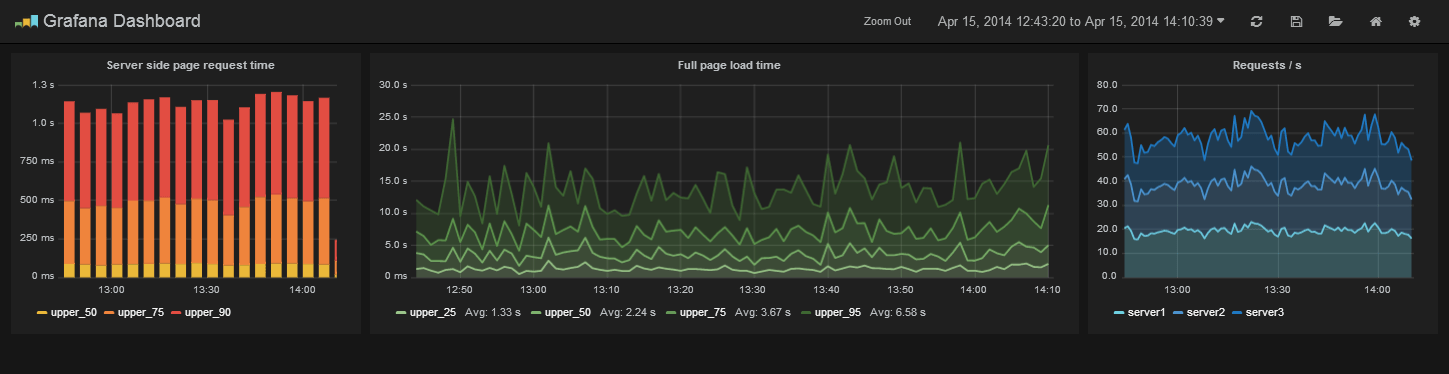
Features
Graphite Target Editor
- Graphite target expression parser
- Quickly add / edit / remove function (video demo)
- Function parameters can be easily changed
- Quickly navigate graphite metric structure
- Templating
- Integrated links to function documentation
- Rearrange function order
- Native Graphite PNG render support
Graphing
- Fast rendering, even over large timespans.
- Click and drag to zoom.
- Multiple Y-axis.
- Bars, Lines, Points.
- Smart Y-axis formating
- Series toggles & color selector
- Legend values, and formating options
- Grid thresholds, axis labels
- Annotations
Dashboards
- Create and edit dashboards
- Drag and drop graphs to rearrange
- Set column spans and row heights
- Save & search dashboards
- Import & export dashboard (json file)
- Import dashboard from Graphite
- Templating
- Scripted dashboards (generate from js script and url parameters)
- Flexible time range controls
- Dashboard playlists
InfluxDB
- Use InfluxDB as metric datasource
- Query editor with series and column typeahead, easy group by and function selection
OpenTSDB
- Query editor with metric name typeahead and tag filtering
Requirements
Grafana is very easy to install. It is a client side web app with no backend. Any webserver will do. Optionally you will need ElasticSearch if you want to be able to save and load dashboards quickly instead of json files or local storage.
Installation
- Download and extract the latest release.
- Rename
config.sample.jstoconfig.js, then changegraphiteUrlandelasticsearchto point to the correct urls. The urls entered here must be reachable by your browser. - Point your browser to the installation.
To run from master:
- Clone this repository
- Start a web server in src folder
- Or create a optimized & minified build:
- npm install (requires nodejs)
- grunt build (requires grunt-cli)
If you use ansible for provisioning and deployment ansible-grafana should get you started.
When you have Grafana up an running, read the Getting started guide for an introduction on how to use Grafana and/or watch this video for a guide in creating a new dashboard and for creating templated dashboards.
Graphite server config
If you haven't used an alternative dashboard for graphite before you need to enable cross-domain origin request. For Apache 2.x:
Header set Access-Control-Allow-Origin "*"
Header set Access-Control-Allow-Methods "GET, OPTIONS"
Header set Access-Control-Allow-Headers "origin, authorization, accept"
Note that using "*" leaves your graphite instance quite open so you might want to consider using "http://my.graphite-dom.ain" in place of "*"
Here is the same thing, in nginx format:
add_header  "Access-Control-Allow-Origin" "*";
add_header  "Access-Control-Allow-Credentials" "true";
add_header  "Access-Control-Allow-Methods" "GET, OPTIONS";
add_header  "Access-Control-Allow-Headers" "Authorization, origin, accept";
If your Graphite web is protected by basic authentication, you have to enable the HTTP verb OPTIONS, origin (no wildcards are allowed in this case) and add Access-Control-Allow-Credentials. This looks like the following for Apache:
Header set Access-Control-Allow-Origin "http://mygrafana.com:5656"
Header set Access-Control-Allow-Credentials true

<Location />
    AuthName "graphs restricted"
    AuthType Basic
    AuthUserFile /etc/apache2/htpasswd
    <LimitExcept OPTIONS>
      require valid-user
    </LimitExcept>
</Location>
And in nginx:
auth_basic            "Restricted";
auth_basic_user_file  /path/to/my/htpasswd/file;
if ($http_origin ~* (https?://[^/]*\.somedomain\.com(:[0-9]+)?)) {  #Test if request is from allowed domain, you can use multiple if
    set $cors "true";                                               #statements to allow multiple domains, simply setting $cors to true in each one.
}
if ($cors = 'true') {
    add_header  Access-Control-Allow-Origin $http_origin;           #this mirrors back whatever domain the request came from as authorized, as
    add_header  "Access-Control-Allow-Credentials" "true";          #as long as it matches one of your if statements
    add_header  "Access-Control-Allow-Methods" "GET, OPTIONS";
    add_header  "Access-Control-Allow-Headers" "Authorization, origin, accept";
}
Roadmap
- Improve and refine the target parser and editing
- Improve graphite import feature
- Refine and simplify common tasks
- More panel types (not just graphs)
- Use elasticsearch to search for metrics
- Improve template support
- Annotate graph by querying ElasticSearch for events (or other event sources)
Contribute
If you have any idea for an improvement or found a bug do not hesitate to open an issue. And if you have time clone this repo and submit a pull request and help me make Grafana the kickass metrics & devops dashboard we all dream about!
Clone repository:
- npm install
- grunt server (starts development web server in src folder)
- grunt (runs jshint and less -> css compilation)
Notice
This software is based on the great log dashboard kibana.
License
Grafana is distributed under Apache 2.0 License.